Moz Q&A is closed.
After more than 13 years, and tens of thousands of questions, Moz Q&A closed on 12th December 2024. Whilst we’re not completely removing the content - many posts will still be possible to view - we have locked both new posts and new replies. More details here.
Keywords are indexed on the home page
-
Hello everyone,
For one of our websites, we have optimized for many keywords. However, it seems that every keyword is indexed on the home page, and thus not ranked properly. This occurs only on one of our many websites. I am wondering if anyone knows the cause of this issue, and how to solve it.
Thank you.
-
No, I wouldn't say that would cause such issues.
Your pages should get indexed eventually, as they are in your sitemaps (at least the ones I checked), so I am not surprised you're not seeing issues in reports.
But, tools like Moz will often struggle to give more strategic advice (not that we aren't working on it!), and in this case, if these pages are a priority, you need to prominently link to them within your site - this is the most reliably way to ensure rapid indexing.
-
@tom-capper Hey Tom, thanks a lot for all your support so far.
What I have noticed in other campaigns too, is that our websites have CLS (cumulative layout shift) problems. This is the only issue that I found in the account for Brekken. Do you know by any chance if this is something that causes pages to not get indexed correctly?
Thanks!
-
@ginovdw said in Keywords are indexed on the home page:
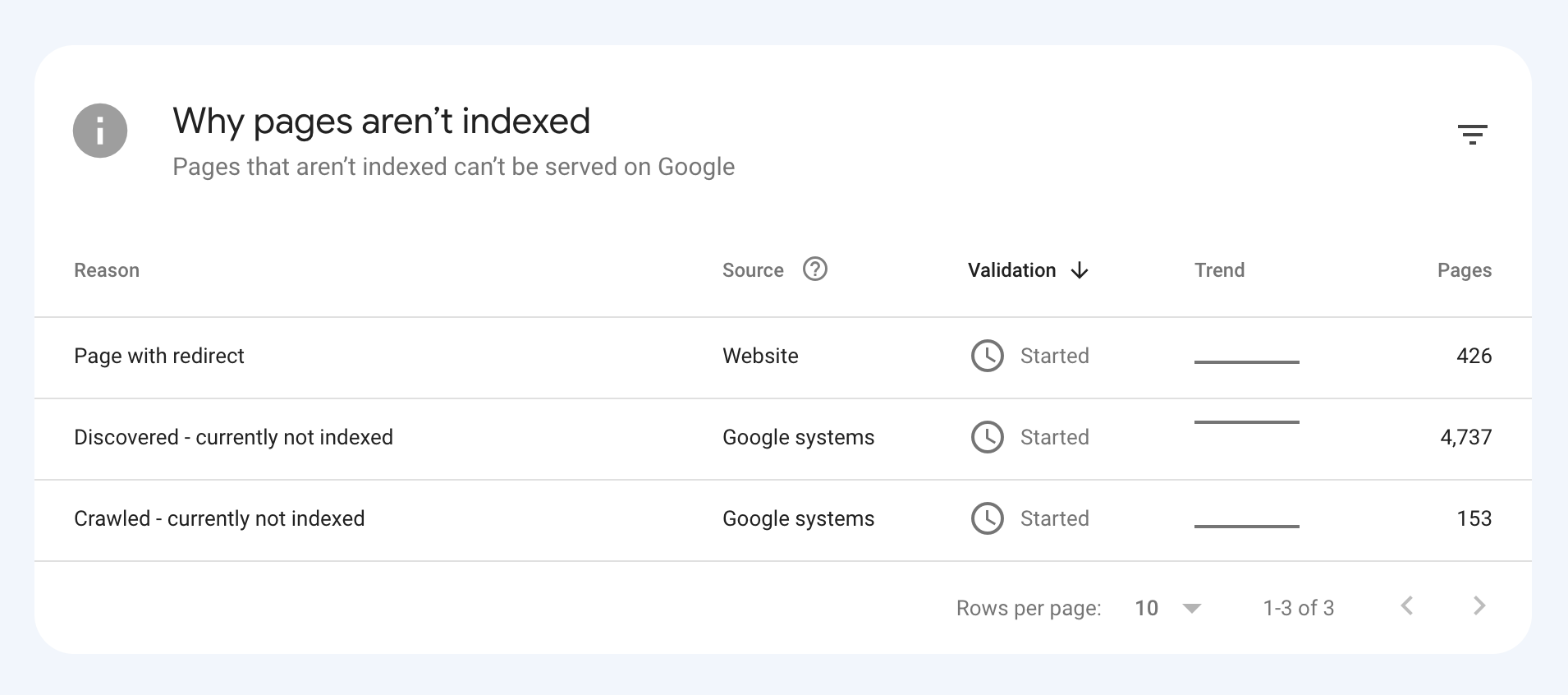
It seems like some of those simply aren't indexed.
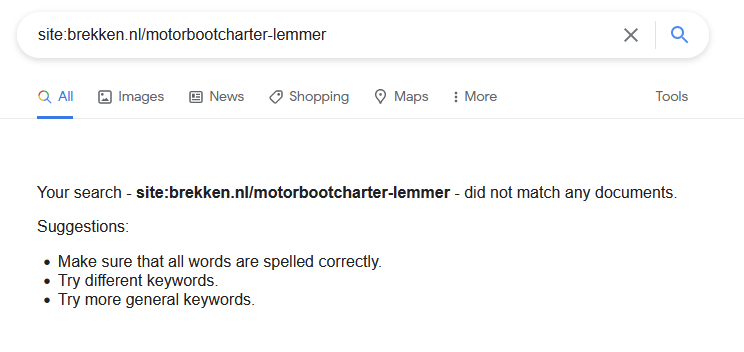
As above, I recommend you investigate in Google Search Console for a clearer idea of why it isn't indexed, but I notice with /motorbootcharter-lemmer it is listed in your sitemaps, so probably Google will index it eventually.
If you want Google to better understand the value of these pages, consider including them in your main navigation, or linking from the homepage.
-
@ginovdw Have you been able to confirm that those other pages are crawled, indexed, and correctly rendered by Google?
For example, what happens if you inspect them in Google Search Console?
-
So, an example of one of our websites is below:
We optimized the following keywords on the following pages:
Motorbootcharter Lemmer: https://brekken.nl/motorbootcharter-lemmer
Jachtverhuur Lemmer:
https://brekken.nl/jachtverhuur-lemmerBootverhuur IJsselmeer:
https://brekken.nl/bootverhuur-ijsselmeerBoot verhuur in Friesland
https://brekken.nl/boot-verhuur-in-frieslandBoot huren IJsselmeer
https://brekken.nl/boot-huren-ijsselmeerYet, they all rank on the home page of our website. Some of these words are not even mentioned on our home page, or just once. I just don't see why they don't rank on their respective keyword which we optimized for, since this works for many of our other websites.
-
@ginovdw En effet, donnez plus d'informations, sinon ce n'est pas tout à fait clair avec quoi vous comparez et avec quoi voulez-vous vous classer ?
-
@tom-capper Thanks for your response! It's exactly what you mentioned. We have many pages optimized for those terms, but they all rank on our homepage.
-
@ginovdw Heya
Could you explain a little more what you're running in to?
For example, when you say that keywords are indexed on the homepage, do you mean that your homepage is ranking for all terms, even though you have optimized other pages for those terms?

Got a burning SEO question?
Subscribe to Moz Pro to gain full access to Q&A, answer questions, and ask your own.
Browse Questions
Explore more categories
-
Moz Tools
Chat with the community about the Moz tools.
-
SEO Tactics
Discuss the SEO process with fellow marketers
-
Community
Discuss industry events, jobs, and news!
-
Digital Marketing
Chat about tactics outside of SEO
-
Research & Trends
Dive into research and trends in the search industry.
-
Support
Connect on product support and feature requests.
Related Questions
-
Domain keyword ranking
I used to use Searchmetrics (years ago) which enabled me to add in the domain name into their website, and it would provide all the keywords that rank for it. Does Moz do that do you know? Thanks
Keyword Research | | patn_studio0 -
Dynamic Canonical Tag for Search Results Filtering Page
Hi everyone, I run a website in the travel industry where most users land on a location page (e.g. domain.com/product/location, before performing a search by selecting dates and times. This then takes them to a pre filtered dynamic search results page with options for their selected location on a separate URL (e.g. /book/results). The /book/results page can only be accessed on our website by performing a search, and URL's with search parameters from this page have never been indexed in the past. We work with some large partners who use our booking engine who have recently started linking to these pre filtered search results pages. This is not being done on a large scale and at present we only have a couple of hundred of these search results pages indexed. I could easily add a noindex or self-referencing canonical tag to the /book/results page to remove them, however it’s been suggested that adding a dynamic canonical tag to our pre filtered results pages pointing to the location page (based on the location information in the query string) could be beneficial for the SEO of our location pages. This makes sense as the partner websites that link to our /book/results page are very high authority and any way that this could be passed to our location pages (which are our most important in terms of rankings) sounds good, however I have a couple of concerns. • Is using a dynamic canonical tag in this way considered spammy / manipulative? • Whilst all the content that appears on the pre filtered /book/results page is present on the static location page where the search initiates and which the canonical tag would point to, it is presented differently and there is a lot more content on the static location page that isn’t present on the /book/results page. Is this likely to see the canonical tag being ignored / link equity not being passed as hoped, and are there greater risks to this that I should be worried about? I can’t find many examples of other sites where this has been implemented but the closest would probably be booking.com. https://www.booking.com/searchresults.it.html?label=gen173nr-1FCAEoggI46AdIM1gEaFCIAQGYARS4ARfIAQzYAQHoAQH4AQuIAgGoAgO4ArajrpcGwAIB0gIkYmUxYjNlZWMtYWQzMi00NWJmLTk5NTItNzY1MzljZTVhOTk02AIG4AIB&sid=d4030ebf4f04bb7ddcb2b04d1bade521&dest_id=-2601889&dest_type=city& Canonical points to https://www.booking.com/city/gb/london.it.html In our scenario however there is a greater difference between the content on both pages (and booking.com have a load of search results pages indexed which is not what we’re looking for) Would be great to get any feedback on this before I rule it out. Thanks!
Technical SEO | | GAnalytics1 -
Unsolved Site showing up in Google search results for irrelevant keywords
Hi there, one of my client's sites is showing up in Google search results / getting a lot of site traffic from keywords that while very close to words we're actually trying to target on the site, are irrelevant for the client and their site content. Does anyone have ideas of how to address this?
SEO Tactics | | Tunnel70 -
Removing a site from Google index with no index met tags
Hi there! I wanted to remove a duplicated site from the google index. I've read that you can do this by removing the URL from Google Search console and, although I can't find it in Google Search console, Google keeps on showing the site on SERPs. So I wanted to add a "no index" meta tag to the code of the site however I've only found out how to do this for individual pages, can you do the same for a entire site? How can I do it? Thank you for your help in advance! L
Technical SEO | | Chris_Wright1 -
Google has deindexed a page it thinks is set to 'noindex', but is in fact still set to 'index'
A page on our WordPress powered website has had an error message thrown up in GSC to say it is included in the sitemap but set to 'noindex'. The page has also been removed from Google's search results. Page is https://www.onlinemortgageadvisor.co.uk/bad-credit-mortgages/how-to-get-a-mortgage-with-bad-credit/ Looking at the page code, plus using Screaming Frog and Ahrefs crawlers, the page is very clearly still set to 'index'. The SEO plugin we use has not been changed to 'noindex' the page. I have asked for it to be reindexed via GSC but I'm concerned why Google thinks this page was asked to be noindexed. Can anyone help with this one? Has anyone seen this before, been hit with this recently, got any advice...?
Technical SEO | | d.bird0 -
My Website's Home Page is Missing on Google SERP
Hi All, I have a WordPress website which has about 10-12 pages in total. When I search for the brand name on Google Search, the home page URL isn't appearing on the result pages while the rest of the pages are appearing. There're no issues with the canonicalization or meta titles/descriptions as such. What could possibly the reason behind this aberration? Looking forward to your advice! Cheers
Technical SEO | | ugorayan0 -
Is it better to use XXX.com or XXX.com/index.html as canonical page
Is it better to use 301 redirects or canonical page? I suspect canonical is easier. The question is, which is the best canonical page, YYY.com or YYY.com/indexhtml? I assume YYY.com, since there will be many other pages such as YYY.com/info.html, YYY.com/services.html, etc.
Technical SEO | | Nanook10 -
What's the difference between a category page and a content page
Hello, Little confused on this matter. From a website architectural and content stand point, what is the difference between a category page and a content page? So lets say I was going to build a website around tea. My home page would be about tea. My category pages would be: White Tea, Black Tea, Oolong Team and British Tea correct? ( I Would write content for each of these topics on their respective category pages correct?) Then suppose I wrote articles on organic white tea, white tea recipes, how to brew white team etc...( Are these content pages?) Do I think link FROM my category page ( White Tea) to my ( Content pages ie; Organic White Tea, white tea receipes etc) or do I link from my content page to my category page? I hope this makes sense. Thanks, Bill
Technical SEO | | wparlaman0