After more than 13 years, and tens of thousands of questions, Moz Q&A closed on 12th December 2024. Whilst we’re not completely removing the content - many posts will still be possible to view - we have locked both new posts and new replies. More details here.
WordPress Sub-directory for SEO
-
Hi There,
I'm working on a WordPress site that includes a premium content blog with approx 900 posts.
As part of the project, those 900 posts and other membership functionality will be moved from the main site to another site built specifically for content/membership.
Ideally, we want the existing posts to remain on the root domain to avoid a loss in link juice/domain authority.
We initially began setting up a WordPress Multisite using the sub-directory option. This allows for the main site to be at www.website.com and the secondary site to be at www.website.com/secondary.
Unfortunately, the themes and plugins we need for the platform do not play nicely with WordPress Multisite, so we started seeking a new solution, and, discovered that a second instance of WordPress can be installed in a subdirectory on the server. This would give us the same subdirectory structure while bypassing WordPress Multisite and instead, having two separate single-site installs.
Do you foresee any issues with this WordPress subdirectory install? Does Google care/know these are two separate WordPress installs and do we risk losing any link juice/domain authority?
-
@himalayaninstitute said in WordPress Sub-directory for SEO:
WordPress can be installed in a subdirectory
I have done this a lot and I mean a lot what you want to do is set up a reverse proxy on your subdomain and this will allow you to not only bypass having to use multisite for subfolder but if you want to power it separately you can you do not have to it all. You should probably use your same server and power through Fastly our CloudFlare
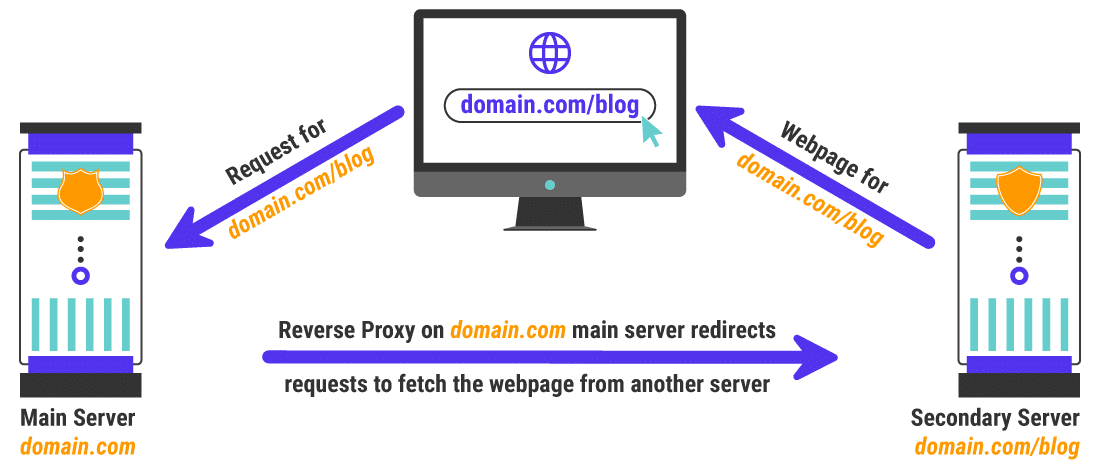
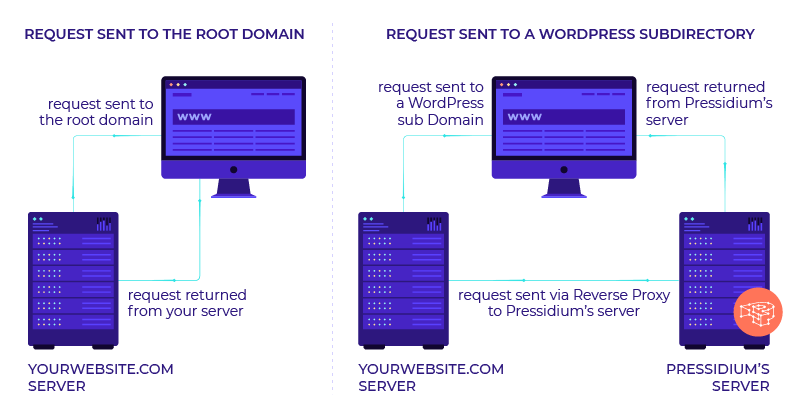
once you set this up it is super easy to keep it running in your entire site will be much faster as a result as well
my response to someone else that needed a subfolder
https://moz.com/community/q/topic/69528/using-a-reverse-proxy-and-301-redirect-to-appear-sub-domain-as-sub-directory-what-are-the-seo-risksplease also look at it explained by these hosting companies is unbelievable easy to implement compared to how it looks and you can do so with Fastly or cloudflare in a matter of minutes
-
https://servebolt.com/help/article/cloudflare-workers-reverse-proxy/
-
https://support.pagely.com/hc/en-us/articles/213148558-Reverse-Proxy-Setup
-
https://wpengine.com/support/using-a-reverse-proxy-with-wp-engine/
-
https://thoughtbot.com/blog/host-your-blog-under-blog-on-your-www-domain
-
https://crate.io/blog/fastly_traffic_spike
*https://support.fastly.com/hc/en-us/community/posts/4407427792397-Set-a-request-condition-to-redirect-URL -
https://coda.io/@matt-varughese/guide-how-to-reverse-proxy-with-cloudflare-workers
-
https://www.cloudflare.com/learning/cdn/glossary/reverse-proxy/
-
https://gist.github.com/LimeCuda/18b88f7ad9cdf1dccb01b4a6bbe398a6
I hope this was of help
tom
-
-
@nmiletic The content section of the site requires a unique UI Design and other robust functionality, so having a separate theme/plugins in its own directory is going to be the way we go here. Thanks for your assistance!
-
@himalayaninstitute Have you thought about adding a page and making all of this new content a subpage? Or changing your permalink structure to include a category in the URL? You can then add all of these posts under that category and have the URL show up as www.example.com/category/page-or-post-name
-
The website at the subdirectory will be an online learning platform with a blog, online courses, memberships, gated content, etc. The content currently lives on the main site, so, it's great that we can move it into the subdirectory without taking a hit from Google.
Since these are fundamentally two separate websites, we're not concerned about needing to manage them independently.
Thanks again for your input and advice, we greatly appreciate it!
-
@amitydigital said in WordPress Sub-directory for SEO:
Google will view it as one site so you shouldn't have any issues from that perspective. The Google bot is just looking at pages and won't know/care that the underlying CMS that is running some pages is a different install than other pages. The downside is you now have two websites to maintain, two themes, two sets of files, etc... That may result in a bit of a headache in the future.
As @amitydigital put it, the issue with your approach would be repetitive tasks. You will not loose any DA nor PA (being that you implement a correct 301 redirection). What is going to be on the subdirectory?
-
Google will view it as one site so you shouldn't have any issues from that perspective. The Google bot is just looking at pages and won't know/care that the underlying CMS that is running some pages is a different install than other pages. The downside is you now have two websites to maintain, two themes, two sets of files, etc... That may result in a bit of a headache in the future.





Got a burning SEO question?
Subscribe to Moz Pro to gain full access to Q&A, answer questions, and ask your own.
Explore more categories
-
Chat with the community about the Moz tools.
-
Discuss the SEO process with fellow marketers
-
Discuss industry events, jobs, and news!
-
Chat about tactics outside of SEO
-
Dive into research and trends in the search industry.
-
Support
Connect on product support and feature requests.
-
-
 06817
06817
-
 07832
07832
-
 0808.4k
-
 032.6k
-
 04918.6k
-
 013.1k
-
 053.0k
-
 0102.0k