The Moz Q&A Forum

    • Forum
    • Questions
    • Users
    • Ask the Community

    Welcome to the Q&A Forum

    Browse the forum for helpful insights and fresh discussions about all things SEO.

    1. SEO and Digital Marketing Forum
    2. Categories
    3. SEO Tactics
    4. Technical SEO
    5. Capturing Source Dynamically for UTM Parameters

    Moz Q&A is closed.

    After more than 13 years, and tens of thousands of questions, Moz Q&A closed on 12th December 2024. Whilst we’re not completely removing the content - many posts will still be possible to view - we have locked both new posts and new replies. More details here.

    Unsolved Capturing Source Dynamically for UTM Parameters

    Technical SEO
    technical seogoogle analyticsutm parameters
    3 3 1.7k
    • Oldest to Newest
    • Newest to Oldest
    • Most Votes
    Reply
    • Reply as question
    Log in to reply
    This topic has been deleted. Only users with topic management privileges can see it.
    • peteboyd
      peteboyd last edited by

      Does anyone have a tutorial on how to dynamically capture the referring source to be populated in UTM parameters for Google Analytics?

      We want to syndicate content and be able to see all of the websites that provided referral traffic for this specific objective. We want to set a specific utm_medium and utm_campaign but have the utm_source be dynamic and capture the referring website.

      If we set a permanent utm_source, it would appear the same for all incoming traffic.

      Thanks in advance!

      Fabian001 1 Reply Last reply Reply Quote 0
      • Shaman-Das-khatri
        Shaman-Das-khatri last edited by

        @peteboyd said in Capturing Source Dynamically for UTM Parameters:

        Thanks in advance!

        UTM (Urchin Tracking Module) parameters are tags that you can add to the end of a URL in order to track the effectiveness of your marketing campaigns. These parameters are used by Google Analytics to help you understand how users are interacting with your website and where they are coming from.

        There are five different UTM parameters that you can use:

        utm_source: This parameter specifies the source of the traffic, such as "google" or "Facebook".

        utm_medium: This parameter specifies the medium of the traffic, such as "cpc" (cost-per-click) or "social".

        utm_campaign: This parameter specifies the name of the campaign, such as "spring_sale" or "promotion".

        utm_term: This parameter specifies the term or keywords used in the campaign, such as "shoes" or "dress".

        utm_content: This parameter specifies the content of the ad, such as the headline or the call-to-action.

        To capture the source dynamically for UTM parameters, you can use JavaScript to get the value of the document. referrer property. This property returns the URL of the page that is linked to the current page. You can then use this value to set the utm_source parameter dynamically.

        For example, you might use the following code to set the utm_source parameter based on the referring URL:

        Copy code
        var utmSource = '';

        if (document.referrer.indexOf('google') !== -1) {
        utmSource = 'google';
        } else if (document.referrer.indexOf('facebook') !== -1) {
        utmSource = 'facebook';
        }

        // Add the utm_source parameter to the URL
        var url = 'http://www.example.com?utm_source=' + utmSource;
        This code will set the utm_source parameter to "google" if the user came to the page from a Google search or to "Facebook" if the user came to the page from Facebook. If the user came to the page from another source, the utm_source parameter will be left empty.

        You can then use this modified URL in your marketing campaigns to track the effectiveness of your campaigns and understand where your traffic is coming from.

        1 Reply Last reply Reply Quote 0
        • Fabian001
          Fabian001 @peteboyd last edited by

          @peteboyd you can refer to this tutorial: https://www.growwithom.com/2020/06/16/track-dynamic-traffic-google-tag-manager/

          Should meet your requirements perfectly - using GTM to replace a static value with the url in your UTM Source.


          1 Reply Last reply Reply Quote 0
          • 1 / 1
          • First post
            Last post

          Got a burning SEO question?

          Subscribe to Moz Pro to gain full access to Q&A, answer questions, and ask your own.


          Start my free trial


          Explore more categories

          • Moz Tools

            Chat with the community about the Moz tools.

            Getting Started
            Moz Pro
            Moz Local
            Moz Bar
            API
            What's New

          • SEO Tactics

            Discuss the SEO process with fellow marketers

            Content Development
            Competitive Research
            Keyword Research
            Link Building
            On-Page Optimization
            Technical SEO
            Reporting & Analytics
            Intermediate & Advanced SEO
            Image & Video Optimization
            International SEO
            Local SEO

          • Community

            Discuss industry events, jobs, and news!

            Moz Blog
            Moz News
            Industry News
            Jobs and Opportunities
            SEO Learn Center
            Whiteboard Friday

          • Digital Marketing

            Chat about tactics outside of SEO

            Affiliate Marketing
            Branding
            Conversion Rate Optimization
            Web Design
            Paid Search Marketing
            Social Media

          • Research & Trends

            Dive into research and trends in the search industry.

            SERP Trends
            Search Behavior
            Algorithm Updates
            White Hat / Black Hat SEO
            Other SEO Tools

          • Support

            Connect on product support and feature requests.

            Product Support
            Feature Requests
            Participate in User Research

          • See all categories

          • Meta name Author
            WayneM.
            WayneM.
            0
            9
            1.3k

          • How to Boost Your WordPress Website Speed to 95+ (Without Premium Plugins)
            mohammadrehanseo
            mohammadrehanseo
            0
            15
            1.7k

          • Landing pages report has no data even if I have ranking keywords and traffic
            davidevans_seo
            davidevans_seo
            0
            20
            4.5k

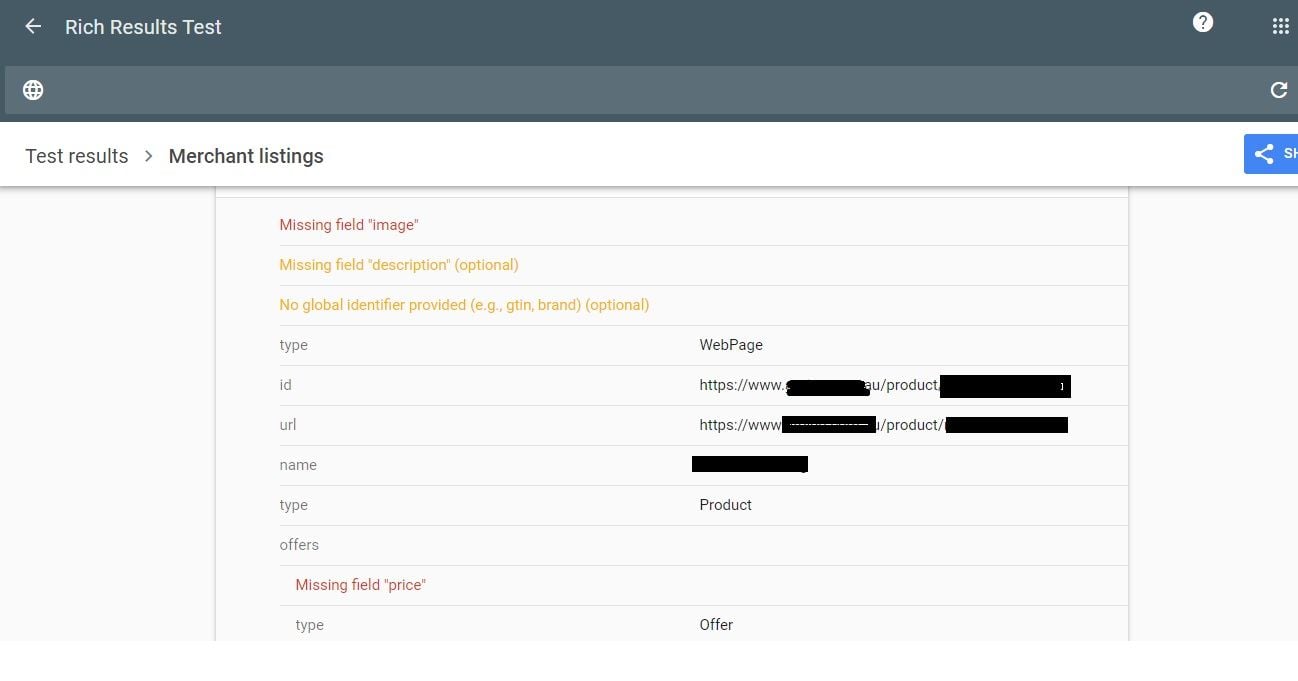
          • Why Product pages are throwing Missing field "image" and Missing field "price" in Wordpress Woocommerce
            Ravi_Rana
            Ravi_Rana
            0
            5
            2.0k

          • MOZ API to Google Data Studio
            WebMarkets
            WebMarkets
            0
            1
            1.8k

          • What's Causing My Extremely Low Bounce Rate
            bradsimonis
            bradsimonis
            0
            3
            3.5k

          • How to solve orphan pages on a job board
            Michael_M
            Michael_M
            2
            3
            3.9k

          • Abnormally High Direct Traffic Volume
            graceflack 0
            graceflack 0
            1
            3
            3.6k

          Get started with Moz Pro!

          Unlock the power of advanced SEO tools and data-driven insights.

          Start my free trial
          Products
          • Moz Pro
          • Moz Local
          • Moz API
          • Moz Data
          • STAT
          • Product Updates
          Moz Solutions
          • SMB Solutions
          • Agency Solutions
          • Enterprise Solutions
          • Digital Marketers
          Free SEO Tools
          • Domain Authority Checker
          • Link Explorer
          • Keyword Explorer
          • Competitive Research
          • Brand Authority Checker
          • Local Citation Checker
          • MozBar Extension
          • MozCast
          Resources
          • Blog
          • SEO Learning Center
          • Help Hub
          • Beginner's Guide to SEO
          • How-to Guides
          • Moz Academy
          • API Docs
          About Moz
          • About
          • Team
          • Careers
          • Contact
          Why Moz
          • Case Studies
          • Testimonials
          Get Involved
          • Become an Affiliate
          • MozCon
          • Webinars
          • Practical Marketer Series
          • MozPod
          Connect with us

          Contact the Help team

          Join our newsletter
          Moz logo
          © 2021 - 2026 SEOMoz, Inc., a Ziff Davis company. All rights reserved. Moz is a registered trademark of SEOMoz, Inc.
          • Accessibility
          • Terms of Use
          • Privacy

          Looks like your connection to Moz was lost, please wait while we try to reconnect.