After more than 13 years, and tens of thousands of questions, Moz Q&A closed on 12th December 2024. Whilst we’re not completely removing the content - many posts will still be possible to view - we have locked both new posts and new replies. More details here.
The particular page cannot be indexed by Google
-
Hello, Smart People!
We need help solving the problem with Google indexing.
All pages of our website are crawled and indexed. All pages, including those mentioned, meet Google requirements and can be indexed. However, only this page is still not indexed.
Robots.txt is not blocking it.
We do not have a tag "nofollow"
We have it in the sitemap file.
We have internal links for this page from indexed pages.
We requested indexing many times, and it is still grey.
The page was established one year ago.
We are open to any suggestions or guidance you may have. What else can we do to expedite the indexing process? -
Hi, we had a problem, indexing a new post, through Google Search Console, but we believe that's because they been rolling out an Google update this week, we tried this morning, and it worked, a new blog post for our website design business got indexed. so, it could be because of an algorithm update rolling out?
-
I launched a website about two months ago that got indexed right away. However, after 25 to 30 days, when I checked again, it was de-indexed, but then it got indexed again.
After that, the website's position in the search engine results page (SERP) was fluctuating. Can someone tell me what the issue might be?
-
Same issue with some of pages as well. I tried many tactics but still it is Non-Indexed.
My Pages are:
https://checkseotools.com/online-text-editor
https://checkseotools.com/number-generator
and more 4 pages.Any expert here can guide me please.
-
If a particular page cannot be indexed by Google, it could be due to several reasons:
- Noindex Tag: The page may have a
noindexmeta tag, instructing search engines not to index it. - Robots.txt Block: The page might be blocked from crawling in the
robots.txtfile, preventing Google from accessing it. - Lack of Quality Content: Thin or duplicate content may cause Google to avoid indexing the page.
- Technical Issues: Broken links, server errors, or incorrect canonical tags can also prevent indexing.
- Manual Actions: Google might have applied a manual action if the page violates their guidelines.
Addressing these issues can help the page get indexed properly.
You want motivational Quotes, Positive Thoughts . You Can also check the Website.
- Noindex Tag: The page may have a
-
If your page cannot be indexed by Google, it could be due to several reasons. Make sure the page isn’t blocked by robots.txt, that it has a valid noindex tag, or that it's not set to 'noindex' in your CMS. Also, check for any crawl errors in Google Search Console.
By the way, while you're troubleshooting, you can use tools like this website to keep track of your tasks or deadlines. Hope this helps!
-
This page cannot be indexed by Google, potentially affecting its search visibility. To enhance your site’s SEO, consider leveraging [WordPress plugins] or other tools to ensure your content is fully accessible to search engines.
-
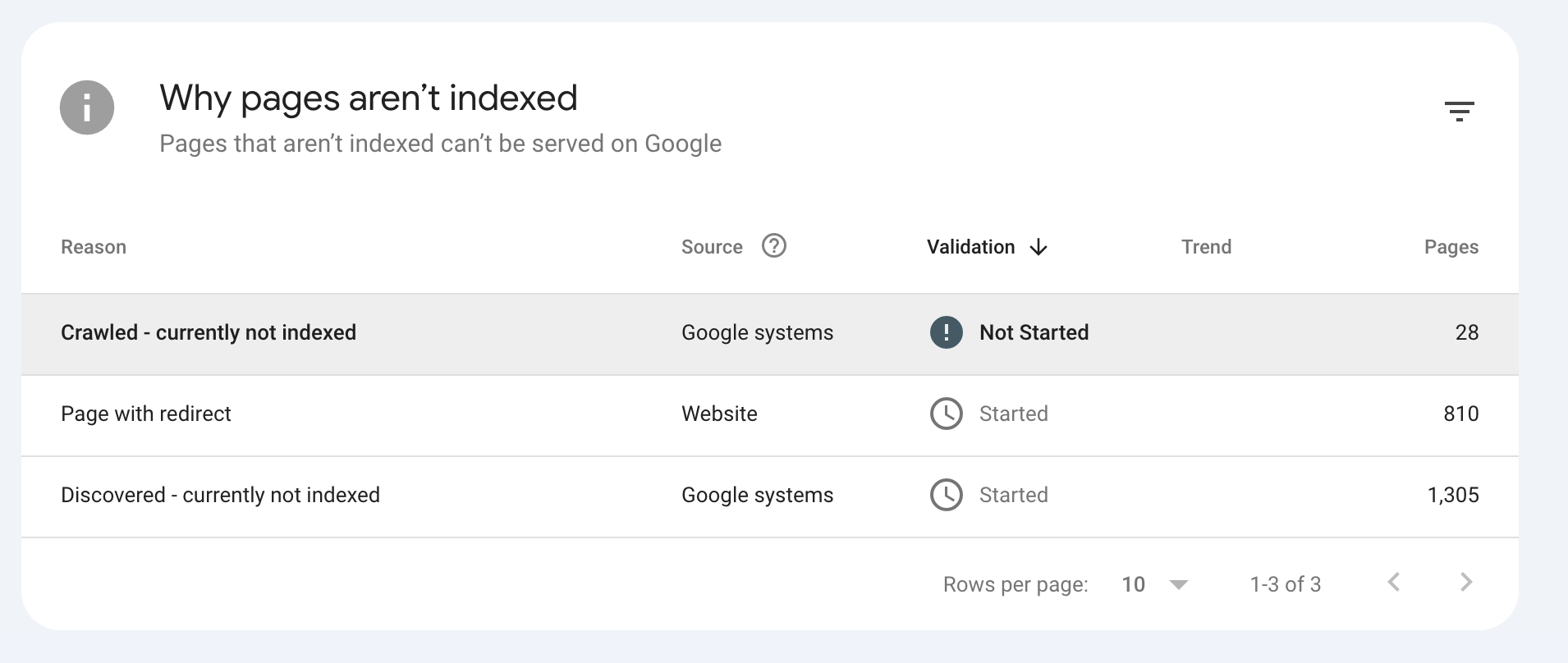
I am facing a similar problem where for my site I developed multiple tools, and google tells me it is known to it, but not indexed can you tell me why:
Any feedback would be helpful?
Tools:
-
My website not show on google Times Of USA. Please guide me
Bgmi community
Newscom
Newscom Tech -
@Viktoriia1805 I am also facing the same issue with my website Facultyhub. Some pages that I submit for indexing are not indexing at all.
Can anyone tell me what I should do? -
It sounds like you've covered all the bases for Google indexing. Since the issue persists despite your efforts, I recommend consulting with SwiftStart Agency. Their expertise in SEO and digital strategy could provide insights specific to your situation and help expedite the indexing process. They specialize in optimizing website visibility and resolving technical SEO challenges like this. They might have additional strategies or diagnostics to pinpoint the issue and get your page indexed promptly.
-
It sounds like you've covered all the bases for Google indexing. Since the issue persists despite your efforts, I recommend consulting with SwiftStart Agency. Their expertise in SEO and digital strategy could provide insights specific to your situation and help expedite the indexing process. They specialize in optimizing website visibility and resolving technical SEO challenges like this. They might have additional strategies or diagnostics to pinpoint the issue and get your page indexed promptly.
-
I’m Ritu working as Digital Marketing Executive in NearLearn. NearLearn is one of the top 10 Machine Learning training in Bangalore India. Also, we providing AI, blockchain, Data Science, Python, Deep Learning, Fullstack, Java, digital marketing courses all over Bangalore, India.
-
Hey @Viktoriia1805,
Would you be able to let us know the URL so we can check this?
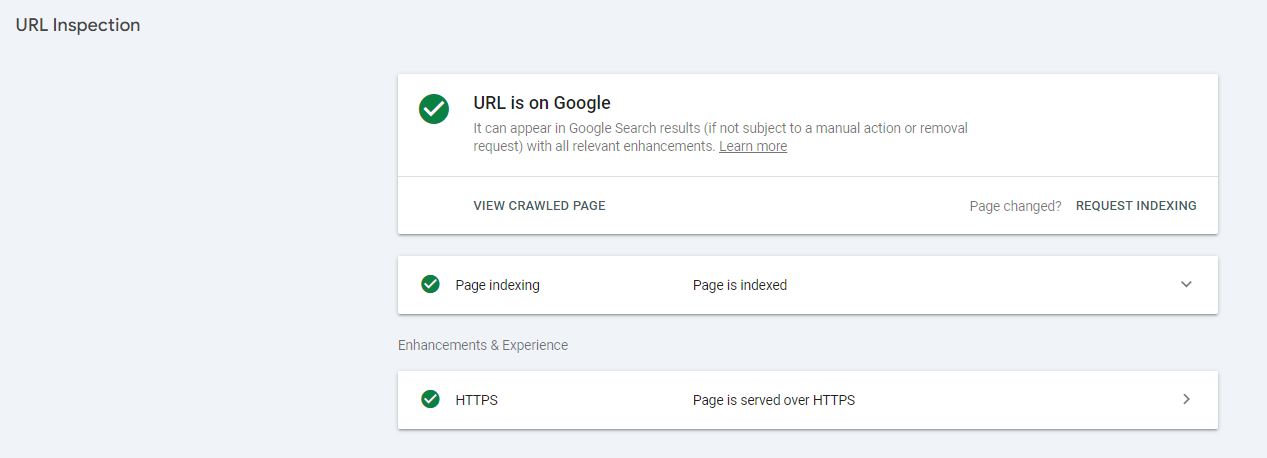
Also are there any errors showing when you run the URL through the inspection tool on Google Search Console (as below)?
-
@Viktoriia1805 said in The particular page cannot be indexed by Google:
Hello, Smart People!
We need help solving the problem with Google indexing.
All pages of our website are crawled and indexed. All pages, including those mentioned, meet Google requirements and can be indexed. However, only this page is still not indexed.
Robots.txt is not blocking it.
We do not have a tag "nofollow"
We have it in the sitemap file.
We have internal links for this page from indexed pages.
We requested indexing many times, and it is still grey.
The page was established one year ago.
We are open to any suggestions or guidance you may have. What else can we do to expedite the indexing process?Check Google Search Console’s URL Inspection Tool for any issues. Make sure your content is high-quality and unique. Get some good backlinks to the page. Ensure the page is mobile-friendly using Google’s Mobile-Friendly Test. Improve the page’s load speed.
Check that your meta tags are correct and relevant. Keep the page’s content updated regularly. Share the page on social media to boost its visibility and traffic.
If you still have problems, consider talking to an SEO professional for more help. Good luck!
-
@Viktoriia1805 said in The particular page cannot be indexed by Google:
Hello, Smart People!
We need help solving the problem with Google indexing.
All pages of our website are crawled and indexed. All pages, including those mentioned, meet Google requirements and can be indexed. However, only this page is still not indexed.
Robots.txt is not blocking it.
We do not have a tag "nofollow"
We have it in the sitemap file.
We have internal links for this page from indexed pages.
We requested indexing many times, and it is still grey.
The page was established one year ago.
We are open to any suggestions or guidance you may have. What else can we do to expedite the indexing process?Thank you for reaching out. Here are concise steps to address the indexing issue:
Manual Actions: Check Google Search Console for any manual actions.
Crawl Errors: Review "Crawl Stats" in Google Search Console for any errors.
Content Quality: Ensure the page has unique, valuable content.
Internal Linking: Increase and improve internal links to the page.
External Backlinks: Obtain quality backlinks to the page.
Fetch as Google: Use the "URL Inspection" tool in Google Search Console to request indexing.
Noindex and Canonical Tags: Verify no noindex tags or conflicting canonical tags are present.
Content Freshness: Update the page content regularly.
Page Speed and Mobile Usability: Ensure the page is fast and mobile-friendly.
Structured Data: Implement schema markup on the page.
Server Logs: Check server logs to ensure Googlebot is accessing the page.
Sitemap File: Confirm the sitemap is correctly submitted and includes the page. -
Hello,
Thank you for reaching out. Here are concise steps to address the indexing issue:
Manual Actions: Check Google Search Console for any manual actions.
Crawl Errors: Review "Crawl Stats" in Google Search Console for any errors.
Content Quality: Ensure the page has unique, valuable content.
Internal Linking: Increase and improve internal links to the page.
External Backlinks: Obtain quality backlinks to the page.
Fetch as Google: Use the "URL Inspection" tool in Google Search Console to request indexing.
Noindex and Canonical Tags: Verify no noindex tags or conflicting canonical tags are present.
Content Freshness: Update the page content regularly.
Page Speed and Mobile Usability: Ensure the page is fast and mobile-friendly.
Structured Data: Implement schema markup on the page.
Server Logs: Check server logs to ensure Googlebot is accessing the page.
Sitemap File: Confirm the sitemap is correctly submitted and includes the page.
I am an SEO expert and these steps will hopefully help because i was facing the same issue with my website (https://picoworkers.net/) and solve this issue with above steps. -
@Viktoriia1805 Page that cannot be indexed https://almamoving.com/moving-services/long-distance-moving-solutions/






Got a burning SEO question?
Subscribe to Moz Pro to gain full access to Q&A, answer questions, and ask your own.
Explore more categories
-
Chat with the community about the Moz tools.
-
Discuss the SEO process with fellow marketers
-
Discuss industry events, jobs, and news!
-
Chat about tactics outside of SEO
-
Dive into research and trends in the search industry.
-
Support
Connect on product support and feature requests.
-
-
 04532
04532
-
 18714
18714
-
 2221.8k
-
 05522
05522
-
 092.6k
-
 0102.6k
-
 0305.1k
-
 044.0k