Moz Q&A is closed.
After more than 13 years, and tens of thousands of questions, Moz Q&A closed on 12th December 2024. Whilst we’re not completely removing the content - many posts will still be possible to view - we have locked both new posts and new replies. More details here.
How to index e-commerce marketplace product pages
-
Hello!
We are an online marketplace that submitted our sitemap through Google Search Console 2 weeks ago. Although the sitemap has been submitted successfully, out of ~10000 links (we have ~10000 product pages), we only have 25 that have been indexed.
I've attached images of the reasons given for not indexing the platform.
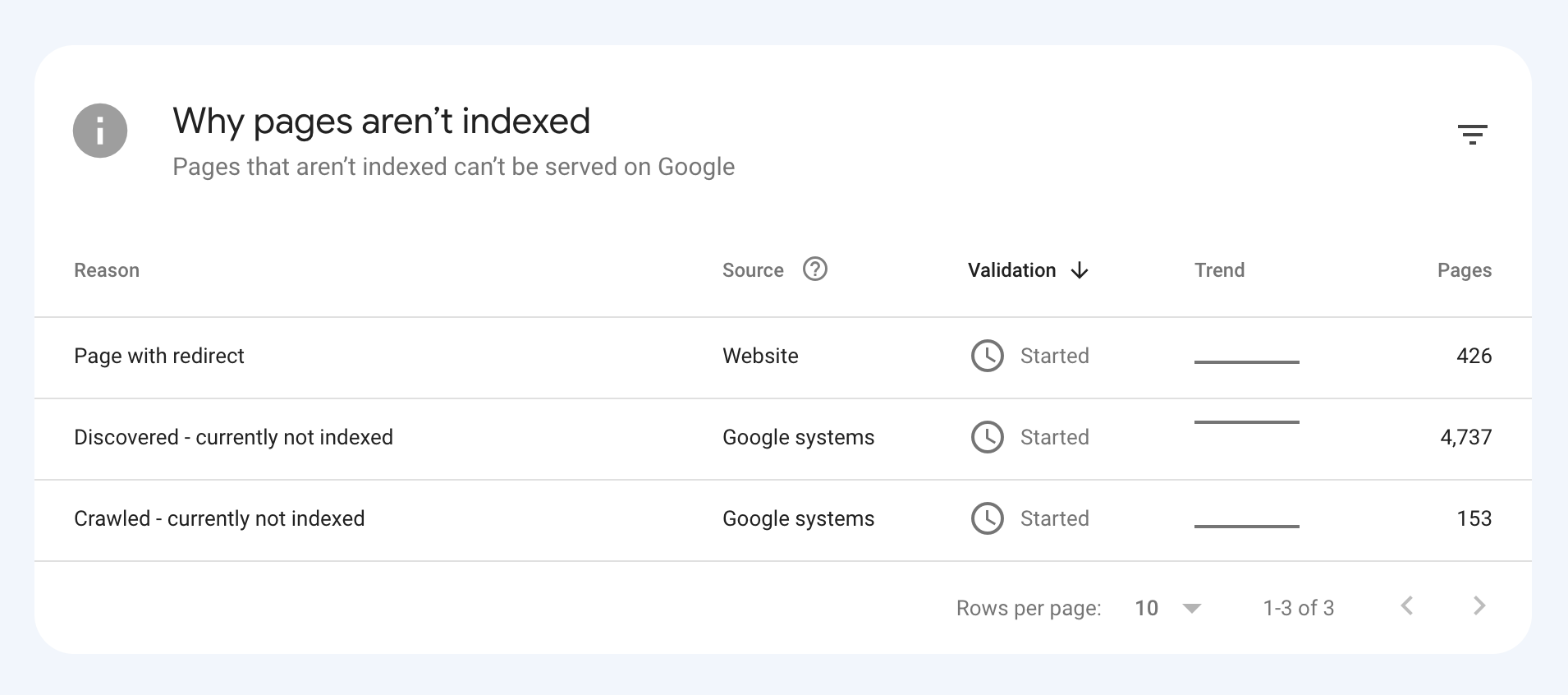
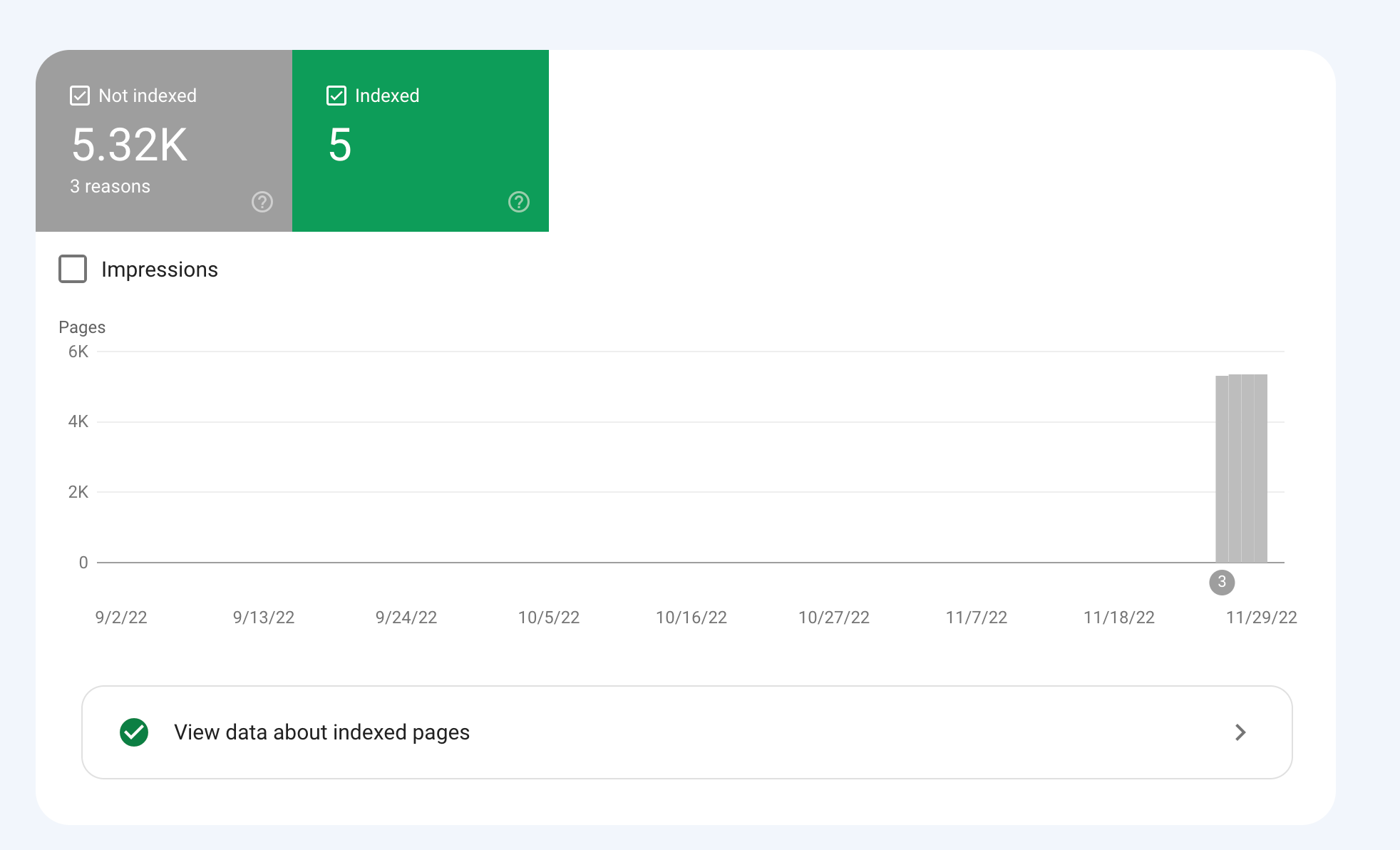
How would we go about fixing this?
-
To get your e-commerce marketplace product pages indexed, make sure your pages include unique and descriptive titles, meta descriptions, relevant keywords, and high-quality images. Additionally, optimize your URLs, leverage schema markup, and prioritize user experience for increased search engine visibility.
-
@fbcosta i hve this problem but its so less in my site
پوشاک پاپیون -
I'd appreciate if someone who faced the same indexing issue comes forward and share the case study with fellow members. Pin points steps a sufferer should do to overcome indexing dilemma. What actionable steps to do to enable quick product indexing? How we can get Google's attention so it can start indexing pages at a quick pace? Actionable advice please.
-
There could be several reasons why only 25 out of approximately 10,000 links have been indexed by Google, despite successfully submitting your sitemap through Google Search Console:
Timing: It is not uncommon for indexing to take some time, especially for larger sites with many pages. Although your sitemap has been submitted, it may take several days or even weeks for Google to crawl and index all of your pages. It's worth noting that not all pages on a site may be considered important or relevant enough to be indexed by Google.
Quality of Content: Google may not index pages that it considers low-quality, thin or duplicate content. If a significant number of your product pages have similar or duplicate content, they may not be indexed. To avoid this issue, make sure your product pages have unique, high-quality content that provides value to users.
Technical issues: Your site may have technical issues that are preventing Google from crawling and indexing your pages. These issues could include problems with your site's architecture, duplicate content, or other issues that may impact crawling and indexing.
Inaccurate Sitemap: There is also a possibility that there are errors in the sitemap you submitted to Google. Check the sitemap to ensure that all the URLs are valid, the sitemap is up to date and correctly formatted.
To troubleshoot this issue, you can check your site's coverage report on Google Search Console, which will show you which pages have been indexed and which ones haven't. You can also check your site's crawl report to see if there are any technical issues that may be preventing Google from crawling your pages. Finally, you can also run a site audit to identify and fix any technical issues that may be impacting indexing.
-
@fbcosta As per my experience, if your site is new it will take some time to index all of the URLs, and the second thing is, if you have Hundreds of URLs, it doesn't mean Google will index all of them.
You can try these steps which will help in fast indexing:
- Sharing on Social Media
- Interlinking from already indexed Pages
- Sitemap
- Share the link on the verified Google My Business Profile (Best way to index fast). You can add by-products or create a post and link it to the website.
- Guest post
I am writing here for the first time, I hope it will help

Got a burning SEO question?
Subscribe to Moz Pro to gain full access to Q&A, answer questions, and ask your own.
Browse Questions
Explore more categories
-
Moz Tools
Chat with the community about the Moz tools.
-
SEO Tactics
Discuss the SEO process with fellow marketers
-
Community
Discuss industry events, jobs, and news!
-
Digital Marketing
Chat about tactics outside of SEO
-
Research & Trends
Dive into research and trends in the search industry.
-
Support
Connect on product support and feature requests.
Related Questions
-
Unsolved Crawling only the Home of my website
Hello,
Product Support | | Azurius
I don't understand why MOZ crawl only the homepage of our webiste https://www.modelos-de-curriculum.com We add the website correctly, and we asked for crawling all the pages. But the tool find only the homepage. Why? We are testing the tool before to suscribe. But we need to be sure that the tool is working for our website. If you can please help us.0 -
Unsolved Using NoIndex Tag instead of 410 Gone Code on Discontinued products?
Hello everyone, I am very new to SEO and I wanted to get some input & second opinions on a workaround I am planning to implement on our Shopify store. Any suggestions, thoughts, or insight you have are welcome & appreciated! For those who aren't aware, Shopify as a platform doesn't allow us to send a 410 Gone Code/Error under any circumstance. When you delete or archive a product/page, it becomes unavailable on the storefront. Unfortunately, the only thing Shopify natively allows me to do is set up a 301 redirect. So when we are forced to discontinue a product, customers currently get a 404 error when trying to go to that old URL. My planned workaround is to automatically detect when a product has been discontinued and add the NoIndex meta tag to the product page. The product page will stay up but be unavailable for purchase. I am also adjusting the LD+JSON to list the products availability as Discontinued instead of InStock/OutOfStock.
Technical SEO | | BakeryTech
Then I let the page sit for a few months so that crawlers have a chance to recrawl and remove the page from their indexes. I think that is how that works?
Once 3 or 6 months have passed, I plan on archiving the product followed by setting up a 301 redirect pointing to our internal search results page. The redirect will send the to search with a query aimed towards similar products. That should prevent people with open tabs, bookmarks and direct links to that page from receiving a 404 error. I do have Google Search Console setup and integrated with our site, but manually telling google to remove a page obviously only impacts their index. Will this work the way I think it will?
Will search engines remove the page from their indexes if I add the NoIndex meta tag after they have already been index?
Is there a better way I should implement this? P.S. For those wondering why I am not disallowing the page URL to the Robots.txt, Shopify won't allow me to call collection or product data from within the template that assembles the Robots.txt. So I can't automatically add product URLs to the list.0 -
Is there a way to get a list of all pages of your website that are indexed in Google?
I am trying to put together a comprehensive list of all pages that are indexed in Google and have differing opinions on how to do this.
Technical SEO | | SpodekandCo0 -
Indexing product attributes in sitemap
Hey Mozzers! I'm battling a few questions about the sitemap for my ecommerce store. Could you help me out? Is it necessary to include your product attributes in the sitemap? I'm not sure why it would matter to have a sitemap that lists everything in the color cherry. Also, if the attributes were included in the sitemap, would that count as duplicate content for the same products to show up in multiple attributes? Is there any benefit to submitting the sitemaps individually? For example, submitting /product-sitemap.xml, /product_brand-sitemap.xml versus just /sitemap.xml? Any other best practices for managing my ecommerce sitemap, or great resources, would be very helpful. Thank you! a1vUz
Technical SEO | | localwork0 -
Product Variations (rel=canonical or 301) & Duplicate Product Descriptions
Hi All, Hoping for a bit of advice here please, I’ve been tasked with building an e-commerce store and all is going well so far. We decided to use Wordpress with Woocommerce as our shop plugin. I’ve been testing the CSV import option for uploading all our products and I’m a little concerned on two fronts: - Product Variations Duplicate content within the product descriptions **Product Variations: - ** We are selling furniture that has multiple variations (see list below) and as a result it creates c.50 product variations all with their own URL’s. Facing = Left, Right Leg style = Round, Straight, Queen Ann Leg colour = Black, White, Brown, Wood Matching cushion = Yes, No So my question is should I 301 re-direct the variation URL’s to the main product URL as from a user perspective they aren't used (we don't have images for each variation that would trigger the URL change, simply drop down options for the user to select the variation options) or should I add the rel canonical tag to each variation pointing back to the main product URL. **Duplicate Content: - ** We will be selling similar products e.g. A chair which comes in different fabrics and finishes, but is basically the same product. Most, if not all of the ‘long’ product descriptions are identical with only the ‘short’ product descriptions being unique. The ‘long’ product descriptions contain all the manufacturing information, leg option/colour information, graphics, dimensions, weight etc etc. I’m concerned that by having 300+ products all with identical ‘long’ descriptions its going to be seen negatively by google and effect the sites SEO. My question is will this be viewed as duplicate content? If so, are there any best practices I should be following for handling this, other than writing completely unique descriptions for each product, which would be extremely difficult given its basically the same products re-hashed. Many thanks in advance for any advice.
Technical SEO | | Jon-S0 -
Sitemap indexed pages dropping
About a month ago I noticed my pages indexed from my sitemap are dropping.There are 134 pages in my sitemap and only 11 are indexed. It used to be 117 pages and just died off quickly. I still seem to be getting consistant search traffic but I'm just not sure whats causing this. There are no warnings or manual actions required in GWT that I can find.
Technical SEO | | zenstorageunits0 -
Staging & Development areas should be not indexable (i.e. no followed/no index in meta robots etc)
Hi I take it if theres a staging or development area on a subdomain for a site, who's content is hence usually duplicate then this should not be indexable i.e. (no-indexed & nofollowed in metarobots) ? In order to prevent dupe content probs as well as non project related people seeing work in progress or finding accidentally in search engine listings ? Also if theres no such info in meta robots is there any other way it may have been made non-indexable, or at least dupe content prob removed by canonicalising the page to the equivalent page on the live site ? In the case in question i am finding it listed in serps when i search for the staging/dev area url, so i presume this needs urgent attention ? Cheers Dan
Technical SEO | | Dan-Lawrence0 -
Getting Pages Indexed That Are Not In The Main Navigation
Hi All, Hoping you can help me out with a couple of questions I have. I am looking to create SEO friendly landing pages optimized for long tail keywords to increase site traffic and conversions. These pages will not live on the main navigation. I am wondering what the best way to get these pages indexed is? Internal text linking, adding to the sitemap? What have you done in this situation? I know that these pages cannot be orphaned pages and they need to be linked to somewhere. Looking for some tips to do this properly and to ensure that they can become indexed. Thanks! Pat
Technical SEO | | PatBausemer0