Moz Q&A is closed.
After more than 13 years, and tens of thousands of questions, Moz Q&A closed on 12th December 2024. Whilst we’re not completely removing the content - many posts will still be possible to view - we have locked both new posts and new replies. More details here.
Keywords are indexed on the home page
-
Hello everyone,
For one of our websites, we have optimized for many keywords. However, it seems that every keyword is indexed on the home page, and thus not ranked properly. This occurs only on one of our many websites. I am wondering if anyone knows the cause of this issue, and how to solve it.
Thank you.
-
No, I wouldn't say that would cause such issues.
Your pages should get indexed eventually, as they are in your sitemaps (at least the ones I checked), so I am not surprised you're not seeing issues in reports.
But, tools like Moz will often struggle to give more strategic advice (not that we aren't working on it!), and in this case, if these pages are a priority, you need to prominently link to them within your site - this is the most reliably way to ensure rapid indexing.
-
@tom-capper Hey Tom, thanks a lot for all your support so far.
What I have noticed in other campaigns too, is that our websites have CLS (cumulative layout shift) problems. This is the only issue that I found in the account for Brekken. Do you know by any chance if this is something that causes pages to not get indexed correctly?
Thanks!
-
@ginovdw said in Keywords are indexed on the home page:
It seems like some of those simply aren't indexed.
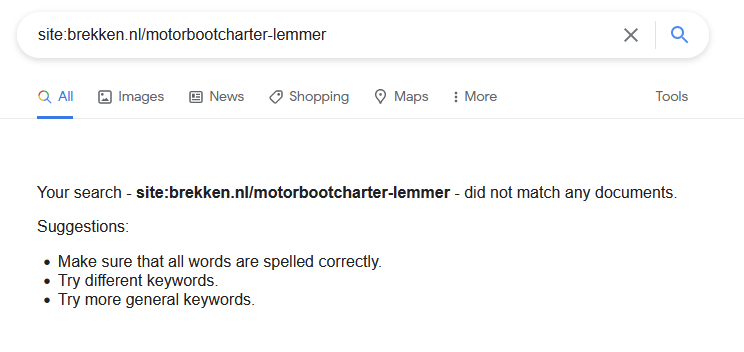
As above, I recommend you investigate in Google Search Console for a clearer idea of why it isn't indexed, but I notice with /motorbootcharter-lemmer it is listed in your sitemaps, so probably Google will index it eventually.
If you want Google to better understand the value of these pages, consider including them in your main navigation, or linking from the homepage.
-
@ginovdw Have you been able to confirm that those other pages are crawled, indexed, and correctly rendered by Google?
For example, what happens if you inspect them in Google Search Console?
-
So, an example of one of our websites is below:
We optimized the following keywords on the following pages:
Motorbootcharter Lemmer: https://brekken.nl/motorbootcharter-lemmer
Jachtverhuur Lemmer:
https://brekken.nl/jachtverhuur-lemmerBootverhuur IJsselmeer:
https://brekken.nl/bootverhuur-ijsselmeerBoot verhuur in Friesland
https://brekken.nl/boot-verhuur-in-frieslandBoot huren IJsselmeer
https://brekken.nl/boot-huren-ijsselmeerYet, they all rank on the home page of our website. Some of these words are not even mentioned on our home page, or just once. I just don't see why they don't rank on their respective keyword which we optimized for, since this works for many of our other websites.
-
@ginovdw En effet, donnez plus d'informations, sinon ce n'est pas tout à fait clair avec quoi vous comparez et avec quoi voulez-vous vous classer ?
-
@tom-capper Thanks for your response! It's exactly what you mentioned. We have many pages optimized for those terms, but they all rank on our homepage.
-
@ginovdw Heya
Could you explain a little more what you're running in to?
For example, when you say that keywords are indexed on the homepage, do you mean that your homepage is ranking for all terms, even though you have optimized other pages for those terms?

Got a burning SEO question?
Subscribe to Moz Pro to gain full access to Q&A, answer questions, and ask your own.
Browse Questions
Explore more categories
-
Moz Tools
Chat with the community about the Moz tools.
-
SEO Tactics
Discuss the SEO process with fellow marketers
-
Community
Discuss industry events, jobs, and news!
-
Digital Marketing
Chat about tactics outside of SEO
-
Research & Trends
Dive into research and trends in the search industry.
-
Support
Connect on product support and feature requests.
Related Questions
-
GoogleBot still crawling HTTP/1.1 years after website moved to HTTP/2
Whole website moved to https://www. HTTP/2 version 3 years ago. When we review log files, it is clear that - for the home page - GoogleBot continues to only access via HTTP/1.1 protocol Robots file is correct (simply allowing all and referring to https://www. sitemap Sitemap is referencing https://www. pages including homepage Hosting provider has confirmed server is correctly configured to support HTTP/2 and provided evidence of accessing via HTTP/2 working 301 redirects set up for non-secure and non-www versions of website all to https://www. version Not using a CDN or proxy GSC reports home page as correctly indexed (with https://www. version canonicalised) but does still have the non-secure version of website as the referring page in the Discovery section. GSC also reports homepage as being crawled every day or so. Totally understand it can take time to update index, but we are at a complete loss to understand why GoogleBot continues to only go through HTTP/1.1 version not 2 Possibly related issue - and of course what is causing concern - is that new pages of site seem to index and perform well in SERP ... except home page. This never makes it to page 1 (other than for brand name) despite rating multiples higher in terms of content, speed etc than other pages which still get indexed in preference to home page. Any thoughts, further tests, ideas, direction or anything will be much appreciated!
Technical SEO | | AKCAC1 -
Unsolved Mobile Rankings for me and competitors disappear in Moz but still ranking.
Hi, I'm trying to create an SEO report for my client however their mobile rankings have completely disappeared for Google Mobile rankings. Competitors rankings have disappeared as well. Could this be a Moz configuration issue?
Moz Pro | | baddjuju0 -
Google Not Indexing Pages (Wordpress)
Hello, recently I started noticing that google is not indexing our new pages or our new blog posts. We are simply getting a "Discovered - Currently Not Indexed" message on all new pages. When I click "Request Indexing" is takes a few days, but eventually it does get indexed and is on Google. This is very strange, as our website has been around since the late 90's and the quality of the new content is neither duplicate nor "low quality". We started noticing this happening around February. We also do not have many pages - maybe 500 maximum? I have looked at all the obvious answers (allowing for indexing, etc.), but just can't seem to pinpoint a reason why. Has anyone had this happen recently? It is getting very annoying having to manually go in and request indexing for every page and makes me think there may be some underlying issues with the website that should be fixed.
Technical SEO | | Hasanovic1 -
Japanese URL-structured sitemap (pages) not being indexed by Bing Webmaster Tools
Hello everyone, I am facing an issue with the sitemap submission feature in Bing Webmaster Tools for a Japanese language subdirectory domain project. Just to outline the key points: The website is based on a subdirectory URL ( example.com/ja/ ) The Japanese URLs (when pages are published in WordPress) are not being encoded. They are entered in pure Kanji. Google Webmaster Tools, for instance, has no issues reading and indexing the page's URLs in its sitemap submission area (all pages are being indexed). When it comes to Bing Webmaster Tools it's a different story, though. Basically, after the sitemap has been submitted ( example.com/ja/sitemap.xml ), it does report an error that it failed to download this part of the sitemap: "page-sitemap.xml" (basically the sitemap featuring all the sites pages). That means that no URLs have been submitted to Bing either. My apprehension is that Bing Webmaster Tools does not understand the Japanese URLs (or the Kanji for that matter). Therefore, I generally wonder what the correct way is to go on about this. When viewing the sitemap ( example.com/ja/page-sitemap.xml ) in a web browser, though, the Japanese URL's characters are already displayed as encoded. I am not sure if submitting the Kanji style URLs separately is a solution. In Bing Webmaster Tools this can only be done on the root domain level ( example.com ). However, surely there must be a way to make Bing's sitemap submission understand Japanese style sitemaps? Many thanks everyone for any advice!
Technical SEO | | Hermski0 -
Does a no-indexed parent page impact its child pages?
If I have a page* in WordPress that is set as private and is no-indexed with Yoast, will that negatively affect the visibility of other pages that are set as children of that first page? *The context is that I want to organize some of the pages on a business's WordPress site into silos/directories. For example, if the business was a home remodeling company, it'd be convenient to keep all the pages about bathrooms, kitchens, additions, basements, etc. bundled together under a "services" parent page (/services/kitchens/, /services/bathrooms/, etc.). The thing is that the child pages will all be directly accessible from the menus, so there doesn't need to be anything on the parent /services/ page itself. Another such parent page/directory/category might be used to keep different photo gallery pages together (/galleries/kitchen-photos/, /galleries/bathroom-photos/, etc.). So again, would it be safe for pages like /services/kitchens/ and /galleries/addition-photos/ if the /services/ and /galleries/ pages (but not /galleries/* or anything like that) are no-indexed? Thanks!
Technical SEO | | BrianAlpert781 -
How Does Google's "index" find the location of pages in the "page directory" to return?
This is my understanding of how Google's search works, and I am unsure about one thing in specific: Google continuously crawls websites and stores each page it finds (let's call it "page directory") Google's "page directory" is a cache so it isn't the "live" version of the page Google has separate storage called "the index" which contains all the keywords searched. These keywords in "the index" point to the pages in the "page directory" that contain the same keywords. When someone searches a keyword, that keyword is accessed in the "index" and returns all relevant pages in the "page directory" These returned pages are given ranks based on the algorithm The one part I'm unsure of is how Google's "index" knows the location of relevant pages in the "page directory". The keyword entries in the "index" point to the "page directory" somehow. I'm thinking each page has a url in the "page directory", and the entries in the "index" contain these urls. Since Google's "page directory" is a cache, would the urls be the same as the live website (and would the keywords in the "index" point to these urls)? For example if webpage is found at wwww.website.com/page1, would the "page directory" store this page under that url in Google's cache? The reason I want to discuss this is to know the effects of changing a pages url by understanding how the search process works better.
Technical SEO | | reidsteven750 -
WordPress - How to stop both http:// and https:// pages being indexed?
Just published a static page 2 days ago on WordPress site but noticed that Google has indexed both http:// and https:// url's. Usually I only get http:// indexed though. Could anyone please explain why this may have happened and how I can fix? Thanks!
Technical SEO | | Clicksjim1 -
Determining When to Break a Page Into Multiple Pages?
Suppose you have a page on your site that is a couple thousand words long. How would you determine when to split the page into two and are there any SEO advantages to doing this like being more focused on a specific topic. I noticed the Beginner's Guide to SEO is split into several pages, although it would concentrate the link juice if it was all on one page. Suppose you have a lot of comments. Is it better to move comments to a second page at a certain point? Sometimes the comments are not super focused on the topic of the page compared to the main text.
Technical SEO | | ProjectLabs1