Moz Q&A is closed.
After more than 13 years, and tens of thousands of questions, Moz Q&A closed on 12th December 2024. Whilst we’re not completely removing the content - many posts will still be possible to view - we have locked both new posts and new replies. More details here.
Solve Redirect Chains
-
I've gotten a few Redirect Issues that involve Redirect Chains, with the https:// version redirecting to the www. version and then redirecting to the right URL.
Here is an example:
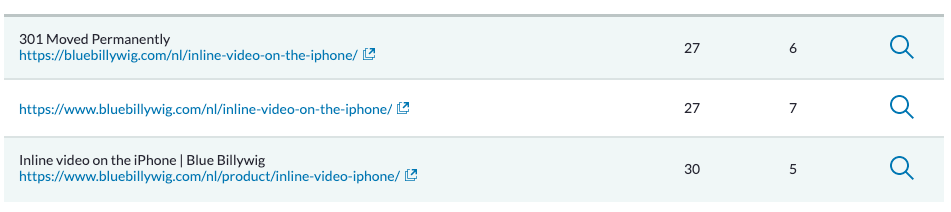
I've tried setting a direct redirect between the first and the last URL, but WordPress doesn't seem to allow that (it's overwritten). I've also tried checking the internal links to make sure that none of the links are the first one. They don't seem to be there.
Does anyone have any tips on solving these Redirect Chains?
-
Even if you've fixed the internal link, the old URL will still be periodically crawled by Google and other crawlers (including Moz!), so it's worth fixing.
The issue may be that you're using WordPress to handle a redirect between two different subdomains, where WordPress is hosted in just one of them. Ideally you would address this at server level.
Got a burning SEO question?
Subscribe to Moz Pro to gain full access to Q&A, answer questions, and ask your own.
Browse Questions
Explore more categories
-
Moz Tools
Chat with the community about the Moz tools.
-
SEO Tactics
Discuss the SEO process with fellow marketers
-
Community
Discuss industry events, jobs, and news!
-
Digital Marketing
Chat about tactics outside of SEO
-
Research & Trends
Dive into research and trends in the search industry.
-
Support
Connect on product support and feature requests.
Related Questions
-
Unsolved No replies from help@moz.com - one of our IPs is blocked by Cloudflare so we cannot access Moz Community from there
Hi all,
Product Support | | DanielDL
I am a bit at my wits end trying to get some acknowledgement from MOZ. Have had no replies, no ticket auto-replies, no updates on any of the messages I have sent via the Moz Help Form on the website. Literally nothing. I wanted to avoid having to post publicly, but does anyone know how to raise a "technical problem" ticket with MOZ? help@moz.com never replies and the Help Form doesn't generate any kind of ticket. From our main office we get an "Access denied" Error (via Cloudflare) specifically for the Moz Community area. This happened to us in February of this year and has been happening again all through May. After testing ourselves with our IT, we determine that MOZ's Cloudflare account has incorrectly blocked the dedicated IP address specific to the internet connection at our head office. This means that none of our Moz User accounts can access anything related to the Community area in our account when working at the studio. We can only do so when working remotely (ie. some other IP address). This is incredibly frustrating, particularly as we've been on a proper paid MOZ account for many years. And I have sent numerous email requests, messages via the Form, etc., and have never heard back from anyone at all. The problem has been on-going for some time and I guess it is my fault because I tried to politely wait a fair amount of time between each follow-up. Only to realize that, actually, I don't think anyone is monitoring help@moz.com or even the Form submissions, or are even looking into the issue for me. Am hoping this message is seen by someone at Moz so they can let me know what is going on please? Guys..... c'mon.....0 -
How to add multiple locations to an existing GBP
Hi, I'm having trouble finding the option to add multiple locations to an existing GBP account. Can somebody help me?
Local Listings | | Trendi
I believe it can be done throught Google &/or MOZ.
Thank you,0 -
Should I redirect a popular but irrelevant blog post to the home page?
Hi. I'm trying to get my website; www.ciphr.com , to rank for keywords relevant to "HR Software" in the UK. It's a highly competitive industry and we rank ~mid to low on page one for some of our ideal keywords that are highly relevant and high volume. Years ago we took the decision to blog about topics more loosely related to the world of work. One of our blog posts, about plants in the office https://www.ciphr.com/advice/plants-in-the-office/ is popular. It gets decent traffic and consistently builds backlinks to the post without any further effort on our part. The specific page has a PA of 46 and DA of 55 with >500 domains linking to it. This compares to our home page with a PA of 47 and 700 linking domains. It is typically the home page that ranks for our money keywords "HR Software" "HR Systems" in the UK. Because this blog post is so loosely related to our actual business, the traffic it generates is highly unlikely to turn into a customer of ours. I am considering redirecting the blog post to the home page to pass link juice to the home page. The concern I have is that, based on the anchor text and contextual signals from linking pages, Google might then infer that our home page is less relevant for our money keywords and more relevant for "plants". Are my concerns unfounded? What are your thoughts? Should I redirect the blog post to the home page? Another internal page? Keep the blog post live? Thanks
On-Page Optimization | | crichardson19922 -
SERP Hijacking/Content Theft/ 302 Redirect?
Sorry for the second post, thought this should have it's own. Here is the problem I am facing amongst many others. Let's take the search term "Air Jordan Release Dates 2017" and place it into Google Search. Here is a link:
On-Page Optimization | | SneakerFiles
https://www.google.com/#q=air+jordan+release+dates+2017 Towards the bottom of the page, you will see a website that has SneakerFiles (my website) in the title. The exact title is: Air Jordan Release Dates 2016, 2017 | SneakerFiles - Osce Now, this is my content, but not my website. For some reason, Google thinks this is my site. If you click on the link in search, it automatically redirects you to another page (maybe 302 redirect), but in the cache you can see it's mine:
http://webcache.googleusercontent.com/search?q=cache:qrVEUDE1t48J:www.osce.gob.pe/take_p_firm.asp%3F+&cd=8&hl=en&ct=clnk&gl=us I have blocked the websites IP, disallowed my style.css to be used so it just shows a links without the style, still nothing. I have submitted multiple google spam reports as well as feedback from search. At times, my page will return to the search but it gets replaced by this website. I even filed a DMCA with Google, they declined it. I reached out to their Host and Domain register multiple times, never got a response. The sad part about this, it's happening for other keywords, for example if you search "KD 9 Colorways", the first result is for my website but on another domain name (my website does rank 3rd for a different Tag page). The page I worked hard on keeping up to date. I did notice this bit of javascript from the cloaked/hacked/serp hijacking website: I disabled iFrames...(think this helps) so not sure how they are doing this. Any help would be greatly appreciated. Note: I am using Wordpress if that means anything.0 -
After HTTPS upgrade, should I change all internal links, or a general 301 redirect is better?
I recently upgraded to https. Of course most internal links of my old posts are still http. So I set up a 301 redirect in order to make the old link works. In terms od SEO this is good or it is better to update all the internal links to https, manually? In that case can I do it in batch with a search/replace command in the phmyadmin database? any other suggested method? thank you
On-Page Optimization | | micvitale0 -
301 Redirect to external site
Hi guys, We have a client who is getting their website redesigned through us. They are discontinuing couple of their services which will not get featured in the new site. They are fairly well ranked for these services and my client wishes to 301 redirect these pages to an external site owned by his friend so that they benefit out of the ranking. The question is: Will my client's website's general ranking get affected due to 301 redirecting to an external site? The external site is not spammy or red-flagged by Google (at the moment, at least). Thanks in advance!
On-Page Optimization | | RameshNair
Ramesh Nair0 -
How can I fix multiple 404 errors with Wildcard htaccess redirect
Hi all I hope that someone can help.... How can I fix multiple 404 errors with Wildcard htaccess redirect The url in question is: How can I fix multiple 404 errors with Wildcard htaccess redirect http://www.5starweddingdirectory.com/listing/search/Category/luxury_hotels_venues_uk_wedding_venues/exclusive_use_venues/letter/c http://www.5starweddingdirectory.com/listing/location/uk-england/bedfordshire-weddings/franklin-park http://www.5starweddingdirectory.com/deal/location/uk-england/chorley-weddings/curtis-bay etc, going to http://www.5starweddingdirectory.com/business the above is just a few examples, google webmaster is showing over 8.000 404 page not found errors. Thanks in advance.
On-Page Optimization | | Taiger0 -
What is the best way to execute a geo redirect?
Based on what I've read, it seems like everyone agrees an IP-based, server side redirect is fine for SEO if you have content that is "geo" in nature. What I don't understand is how to actually do this. It seems like after a bit of research there are 3 options: You can do a 301 which it seems like most sites do, but that basically means if google crawls you in different US areas (which it may or may not) it essentially thinks you have multiple homepages. Does google only crawl from SF-based IPs? 302 passes no juice, so probably don't want to do that. Yelp does a 303 redirect, which it seems like nobody else does, but Yelp is obviously very SEO-savvy. Is this perhaps a better way that solves for the above issues? Thoughts on what is best approach here?
On-Page Optimization | | jcgoodrich0