Moz Q&A is closed.
After more than 13 years, and tens of thousands of questions, Moz Q&A closed on 12th December 2024. Whilst we’re not completely removing the content - many posts will still be possible to view - we have locked both new posts and new replies. More details here.
MBG Tracker...how to use it?
-
So I am a new blogger that has been submitting guest blog posts to a number of different blogs. It was recommended that I use the MBG Tracker so I can track the back links. The problem is that I am totally lost on how to use this tool. As I said before I am new to this whole thing and I am not really sure what constitutes a "base link" and a "back link." In the author bylines we are linking to different pages within a larger website. If anyone can help me I would really appreciate it!
-
Thanks for the reply Ann! David, SEOmoz and MyBlogGuest are different products, you'll probably find the best help for MBG talking with Ann or using her support forums.
-
Let me try to be very clear. Please email if you have more questions (I got both of your emails, so feel free to use the email)
When guest blogging, are you promoting ONE site in your byline in each of the guest posts? There can be different pages from one site, but one and the same domain.
For example:
- Project name: SEOmoz
- Base domain: seomoz.org
Then when you decide to upload this page, for example: http://www.geekwire.com/2012/seomoz-secret-startup-success-rand-fishkins-tips/ - the tracker will automatically identify the backlink to track - http://www.seomoz.org/dp/seattle-startup-marketing - because it has seomoz.org base domain.
By providing the base domain, you make your own job easier because you don't have to manually provide the tool with the backlink to track!
-
So the base link would be the link to the blog post and the back link is the link that goes back to my site? Is this correct? I had seen the site that you suggested but like I said I was confused by the base link and the back link.
-
Base link is a normal submission with a link. Back link has more value with guest blogging.
HOW DOES THE BACKLINK MONITORING TOOL WORK?
This is the cheapest and simplest alternative I am aware of:
- Receive instant emails if any of your links were removed or nofollowed;
- Track your guest post social popularity (Likes and Tweets)
- Measure traffic from each of your guest posts (for that you’ll need to install a tracking code)
- Identify most efficient backlink sources (for example, to find places where you canguest post again).
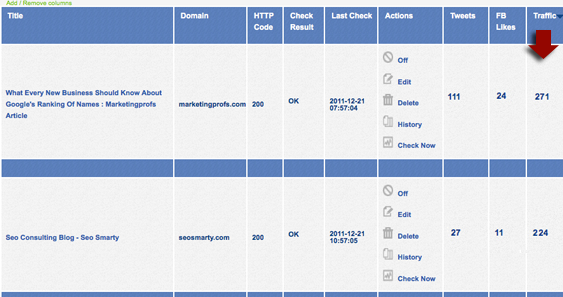
To start tracking your guest posts or links, you’ll need to create a new project and specify your base URL. For all pages you add within one project, this very base URL will be monitored automatically (even if you don’t specify which link within a given page you want to track).
You can add / remove columns from the table (to adjust a clearer view) and sort by each column. You will also receive weekly summaries of your missing links and most popular link sources.
Handy url for more info..... http://www.seosmarty.com/meet-mbg-tracker-the-simplest-and-cheapest-way-to-monitor-your-backlinks/




Got a burning SEO question?
Subscribe to Moz Pro to gain full access to Q&A, answer questions, and ask your own.
Browse Questions
Explore more categories
-
Moz Tools
Chat with the community about the Moz tools.
-
SEO Tactics
Discuss the SEO process with fellow marketers
-
Community
Discuss industry events, jobs, and news!
-
Digital Marketing
Chat about tactics outside of SEO
-
Research & Trends
Dive into research and trends in the search industry.
-
Support
Connect on product support and feature requests.
Related Questions
-

Can I use a 301 redirect to pass 'back link' juice to a different domain?
Hi, I have a backlink from a high DA/PA Government Website pointing to www.domainA.com which I own and can setup 301 redirects on if necessary. However my www.domainA.com is not used and has no active website (but has hosting available which can 301 redirect). www.domainA.com is also contextually irrelevant to the backlink. I want the Government Website link to go to www.domainB.com - which is both the relevant site and which also should be benefiting from from the seo juice from the backlink. So far I have had no luck to get the Government Website's administrators to change the URL on the link to point to www.domainB.com. Q1: If i use a 301 redirect on www.domainA.com to redirect to www.domainB.com will most of the backlink's SEO juice still be passed on to www.domainB.com? Q2: If the answer to the above is yes - would there be benefit to taking this a step further and redirect www.domainA.com to a deeper directory on www.domianB.com which is even more relevant?
Technical SEO | | DGAU
ie. redirect www.domainA.com to www.domainB.com/categoryB - passing the link juice deeper.0 -

Should I use a canonical URL for images uploaded to a blog post in Wordpress?
Hi, I have a wordpress website that has articles/news posts witch contain imagery. I've noticed that in the Media Library, when you upload an image to a blog post it generates a new permalink ...article-name/article-image-01.jpg I have Yoast SEO plugin and have the option to set a canonical URL for this image. Should I point it back to the actual article? Thanks for any helpers with this.
Technical SEO | | Easigrass0 -

Merge 2 websites into one, using a non-existing, new domain.
I need to merge https://www.WebsiteA.com and https://www.WebsiteB.com to a fresh new domain (with no content) https://www.WebsiteC.com. I want to do it the best way to keep existing SEO juice. Website A is the companies home page and built with Wordpress Website B is the company product page and built with Wordpress Website C will be the new site containing both website A and B, utilizing Wordpress also. What is the best way to do this? I have research a lot and keep hitting walls on how to do it. It's a little trickier because it's two different domains going to a brand new domain. Thanks
Technical SEO | | jarydcat10 -

Am I Wasting my time using pingler.com
Ok so here is the question. A few months ago i decided to join pingler.com and pay for the service as i was using the free service, but after four months now i have not noticed any changes and i am just wondering if i am wasting my time using the paid service. would love to hear from people who have or are using the service and let me know if this is a waste of time and my money could be better spent elsewhere. look forward to hearing your thoughts
Technical SEO | | ClaireH-1848860 -
Genesis WP Theme H1 Tag not properly Used?
I am in the process of redesigning my website, and I have been working on the Genesis framework a lot lately, so I used the Genesis framework to make my new site. The URL is http://protechig.com As I look at the H1 on the page (homepage only, every other page has solid h1s from an SEO perspective.) The first thing that I see is that the home page H1 is a links (to protech's home page). The second thing that I see is the the title text is replaced with an image (my logo) and there is a text-indent:-99999; and overflow:hiden; I just want to know from an SEO perspective if this is okay, and, if it isn't, what I could/should to to rectify it. Thanks Zach
Technical SEO | | Zachary_Russell0 -

Trailing Slashes In Url use Canonical Url or 301 Redirect?
I was thinking of using 301 redirects for trailing slahes to no trailing slashes for my urls. EG: www.url.com/page1/ 301 redirect to www.url.com/page1 Already got a redirect for non-www to www already. Just wondering in my case would it be best to continue using htacces for the trailing slash redirect or just go with Canonical URLs?
Technical SEO | | upick-1623910 -
Using hyphenated sub-domains or non-hyphenated sub-domains? What is the question! I Any takers?
For our corporate business level domain, we are exploring using a hyphenated sub-domain foir a project. Something like www.go-figure.extreme.com I thought from a user perspective it seems cluttered. The domain length might also be an issue with the new Algorithm big G has launched in recent past. I know with past experience, hyphenated domains usually take longer to index, as they are used by spammers more frequently and can take longer to get out of the supplementary index. Our company site has over 90 million viewers / year, so our brand is well established and traffic isn't an issue. This is for a corporate level project and I didn't have the answer! Will this work? anyone have any experience testing this. Any thoughts will help! Thanks, Rob
Technical SEO | | RobMay0 -

How to handle sitemap with pages using query strings?
Hi, I'm working to optimize a site that currently has about 5K pages listed in the sitemap. There are not in face this many pages. Part of the problem is that one of the pages is a tool where each sort and filter button produces a query string URL. It seems to me inefficient to have so many items listed that are all really the same page. Not to mention wanting to avoid any duplicate content or low quality issues. How have you found it best to handle this? Should I just noindex each of the links? Canonical links? Should I manually remove the pages from the sitemap? Should I continue as is? Thanks a ton for any input you have!
Technical SEO | | 5225Marketing0

